Archive for 2012

Can you text or tweet to rent a car? Yes you can!

Monday, August 6th, 2012

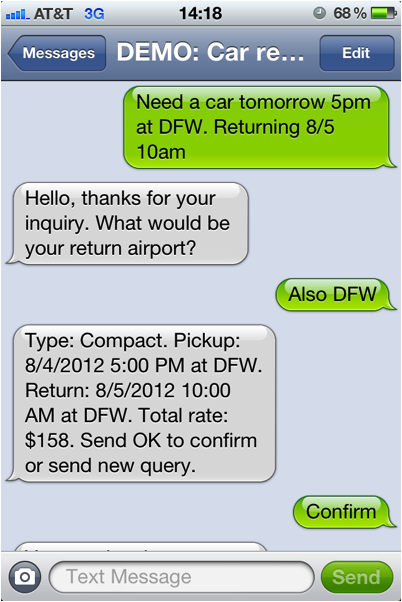
When companies think about automating service inquiries to reduce call center costs, improve service and availability, they think of IVR. And if they think ahead, they think apps. But texting, or even tweeting? Not so much. In a recent blog post I had discussed the idea of using SMS or Twitter for self-service. I had shown examples like car reservation, food or movie orders, and also lead generation on Twitter. I have now gone ahead and created a protoype of a car rental service purely accessible via SMS and Twitter, so that you can experience the convenience yourself. I am using the LinguaSys Carabao engine to interpret the texts and extract slot values.

SMS and Twitter have one thing in common: they force their users to be short and concise with their communication. Furthermore, they are pervasive, fast, and asynchronous – i.e., they do not force users into giving up everything else they are currently doing. In a nutshell: SMS and Twitter are the most convenient self-service channels out there, particularly suited for repetitive, simple tasks.

Check out this interaction on SMS:

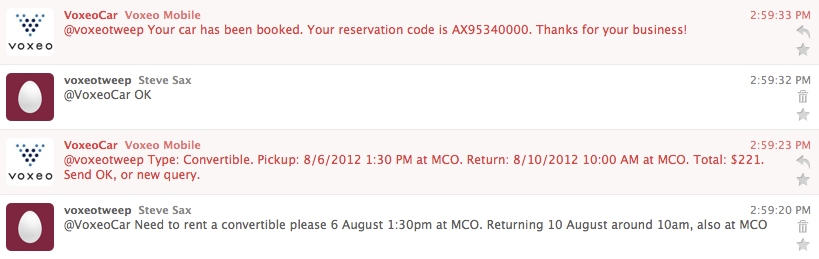
And next, a similar dialog done entirely on Twitter (read from bottom to top):

Look at the timestamps. It took only 13 seconds (!) from me expressing my intent to receiving the confirmation code for the car.

Excited to try it out yourself? Text something like the above to +1 (571) 385-0708, or tweet to @VoxeoCar. The dialogs are managed by VoiceObjects, Voxeo’s multi-channel Application Lifecycle Suite. (Uptime for this demo is not guaranteed)

Note that this works as the rental car company has the user’s cell phone number and/or their Twitter ID on file; that’s how they can relate an inquiry to a customer profile, allowing them to assume standard preferences for things like car type and extras, as defined in the customer’s profile (the profile could be managed through a mobile app, also powered by VoiceObjects).

Has the frequent business traveller ever seen a more convenient way to reserve a car? I am one, and I have not. I would LOVE to use a service like this. What are we waiting for?

Get in touch:

Or leave a comment below.

Mobile Self-Service Apps and the Contact Center – How to Bridge the Gap

Wednesday, July 18th, 2012

Using mobile apps for customer self-service is not new. Companies that offer self-service on more traditional channels like voice (IVR & Contact Center) and Web sites see apps as another way of deflecting expensive calls from the call center – and rightly so. A lot of repetitive, simpler tasks can be done by the customers themselves and do not require agent interaction, such as checking your account balance, paying a bill, renting a car, ordering a product, checking order status, etc.

Apps are where the customers are: they are mobile, they sit in the customer’s pocket. However, there are times when a customer is stuck while self-serving. That’s the time when they usually start searching for the companies’ phone number, switch to the phone feature of their smartphone and start making a call into the contact center. If the company is smart, their IVR allows an option to talk to an agent; nowadays, the reason for customers calling in is often a need to speak to an agent as they have already TRIED self-service. Don’t make the mistake of trying to lock a caller into your IVR with no way out!

If the company is smarter, they let the caller authenticate as a customer with the IVR, connect them to an agent that sits in front of a screen that pulls up the customer’s record automatically. CTI (Computer Telephony Integration – an antiquated term if you ask me; contact centers are more and more shifting to a pure VoIP and thus “software”- i.e. “computer”-based infrastructure) is already technology that bridges some of the gap. But there is still a disconnect. Why does a customer have to a) search for the phone number, and b) leave the app?

There are vendors out there that try to solve the problem by addressing a) only. They provide callback buttons in the app. A customer that is stuck at a certain point can hit a button that will make the contact center call them back, optimally with the app AND the customer context already known when the agent says “Hello…”.

If you ask me, that is not enough. Why do I have to leave the app? Maybe I want to continue exploring, finish the transaction, but simply have a question or need some help in using the app? Voxeo has an answer: Click-To-Talk! Bottomline: a context-sensitive, in-app phone experience.

Using Voxeo VoiceObjects, you can not only build your mobile self-service portal Web app and your IVR presence and SMS services (and Twitter-based self-service solutions) and manage them out of one integrated, enterprise-grade Application Lifecycle Suite… you can now embed a context-sensitive Click-To-Talk button right within your app.

What does context-sensitive mean? It basically means that when you click it, you will be connected to an agent that a) knows you, and b) knows what you tried to do and where you are stuck. They have the context of where you are in your (self-)service transaction. You do not leave the app – the button enables an in-app phone experience. The context-sensitivity is achieved through a CTI link between VoiceObjects, the runtime server driving the app experience, and the contact center. Voxeo has a lot of experience integrating into various contact center suites. The Click-To-Talk feature is realized through Phono, Voxeo’s softphone solution that can sit in any Web browser – or mobile device, allowing phone-to-SIP or phone-to-PSTN connections.

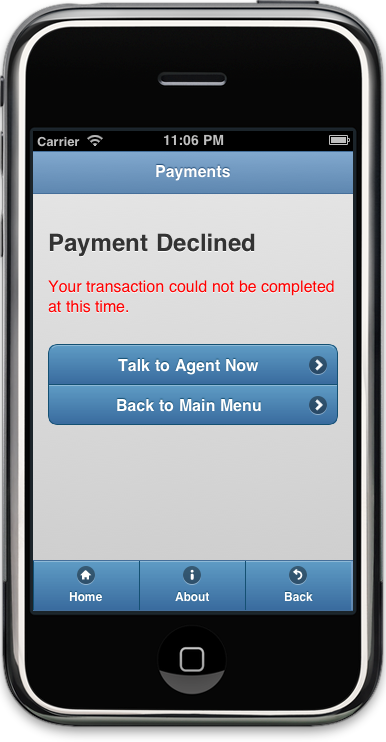
The following screenshot shows how a mobile self-service app with a Click-To-Talk button can look like:


As you can see, you see …nothing. Just a button that says “Talk to Agent Now”. As a matter of fact, if your customer hits that button, an actual phone connection will be established into your call center. The appearance of the app will not change – the transaction can still be completed, maybe with help from the agent.


The biggest challenge with this approach is call volume – how can you provide near-zero wait times to not disrupt the experience? The key lies in knowing your customer and taking context into account when providing this magic button. Using in-app authentication and subsequent CRM integration, you can find out if the customer is eligible for this premium service. Using the CTI link, you can pre-determine agent availability. If you deem the customer eligible and agents are available, turn the button into a Click-To-Talk experience. Otherwise, either hide the button altogether, or turn it into a regular Callback feature, potentially asking the user for their preferred callback phone number. That way, you can ensure optimal experience when you’re ready for it. By only offering the button further down the self-service transaction dialog tree, you additionally prevent misuse. Those users that haven’t authenticated yet or haven’t even TRIED to serve themselves will not see that button. Using Voxeo’s runtime VoiceObjects application server, you can control when and how the magic button is used.


Interested? Get in touch! I would also love to hear your comments/feedback/questions. You can add them below.


Exploring Twitter as a Self-Service Channel

Sunday, May 27th, 2012

Voxeo embraces the idea of Unified Self-Service: “being where the customer is”, serving them on the channel of their choice. Where are lots of them today? Social networks. And more and more every day.

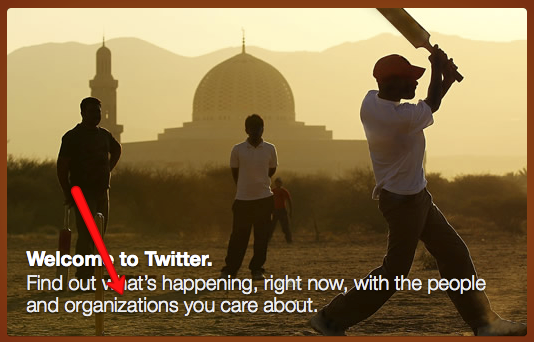
Twitter is traditionally seen as a medium to ask questions, share ideas, and get in touch on. It started as a place for friends and people sharing the same interests, but becomes more and more a hub for customer communication as well. Twitter itself identifies this on their homepage:

What makes this channel so successful? And why do I think it would work as a self-service channel? I think it is its simplicity and convenience: no need to fill out forms on the Web (first waiting for them to load on a mobile device that might currently be where no bars are…), or call a contact center (waiting in queues or dealing with IVRs). I can throw out ideas and questions in free form, not following anyone’s design guidelines (be they GUI or VUI in nature).

How would self-service work over Twitter? Well, what if people asked questions or tweeted things such as:

  • “Where is the closest ATM?“
  • “Wonder where the best pizza is around here…“
  • “I’m in downtown Orlando next week. Anyone got hotel recommendations?“

And what if you’re a bank, pizza, or hotel chain? Wouldn’t it be great if you could invite these people to try out your offerings by automatically engaging in a dialog on Twitter, such as:

  • “@tpgoebel Closest ATM? Tweet ‘ATM’ from smartphone with geolocation turned on, or send ur address, eg ‘55 E Central Blvd, Miami FL’“
  • “@tpgoebel Try out #Ginos! Follow me and DM your cell phone number. You’ll get a 15% discount next time you visit us!“
  • “@tpgoebel We’re conveniently located at beautiful Lake Eola in downtown Orlando. Show us this tweet and you’ll get a welcome cocktail on the house!“

And wouldn’t it be even better if the surprised Twitter users would take you up on your offers and visit your store, restaurant, hotel?

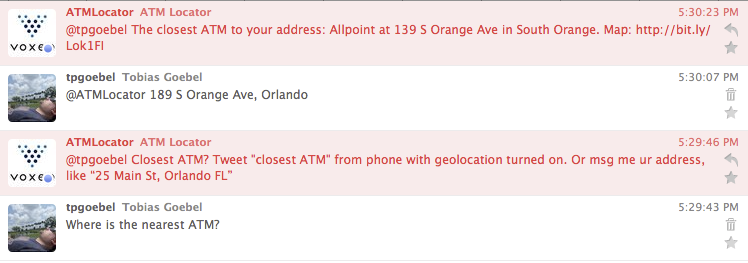
I’ve recently built a functioning prototype of such an application using Voxeo VoiceObjects. Check it out (read from bottom to top):

Notice how the application even embeds a link to Google Maps in its response. A simple touch on the link and I’ll get directions to the closest ATM on my smartphone. How convenient is that?? (And look at the time stamps of the conversation: I got my result in way under a minute – next time I need to find the closest ATM, I’ll simply tweet with geolocation on, and I’ll get my response in a matter of seconds).

Wait a minute – how is that “self-service”?, you might ask; the above examples show some form of “lead generation”, no? (Which, of course, is cool enough). But think a step further: if you collected your customer’s Twitter account ID on sign-up, just like you collect their email address and phone number already, you could offer your existing IVR and mobile Web self-service options also on Twitter. Look at these examples and you’ll see what I mean:

  • “@Avis need a car at PHX tomorrow at 3pm”
    • “@tpgoebel A compact car will be ready for you at PHX on 5/28 at 3pm. Confirmation code #354158“
  • “@JimmyJohns repeat last order”
    • “@tpgoebel A tuna sandwich will be delivered to 189 S Orange Ave in Orlando FL. Confirmation code #132547″
  • “@Dish order Men in Black 3”
    • “@tpgoebel Men in Black 3 will be available for the next 48 hours on channel 65. Enjoy!“

The power of Unified Self-Service is there for you and your business to exploit. The possibilities are endless, your customers will love it. What are you waiting for? Start taking them seriously – start being where they are!


(On the topic of Twitter applications, also check out my recent blog post on a personal Twitter reader for the mobile me…)

See my webinar on the topic:

Meet the Business Tasks

Thursday, May 3rd, 2012

Applications are built in the Voxeo VoiceObjects platform using an object-oriented approach that is based on a set of core object building blocks. Some of these objects relate to standard programming primitives (such as loops or variables); some relate to interactions with the caller (such as inputs or menus). Yet some also relate directly to business-oriented aspects of the application, such as the Layer or the topic of this blog article: the Business Task.

The goal here is to introduce you to the concept, briefly explain how to use it in your applications, and to sketch some of the substantial benefits you can reap for very little effort.

The Concept

When customers call a self-service application, they usually don’t do so for the fun of it. They have a question they want answered, or a transaction they want to perform. As such, from the customer’s point of view the call cannot be considered successful simply if speech recognition worked and the application did not crash somewhere in the middle. Callers must have received their answer, or completed their transaction in order to really be contented with the application’s performance.

So application developers and business analysts face the challenge of tracking this “semantic” information in addition to the more technical data on recognition quality, application errors, etc. This is where Business Tasks come in. They model specific caller actions of different types:

  • Authentication
    E.g. logging in using an account number and PIN, or possibly authentication using biometric means.
  • Information
    E.g. asking for an account balance or an insurance quote.
  • Notification
    E.g. sending out an SMS or email to the caller.
  • Routing
    E.g. transferring the caller to a human agent.
  • Transaction
    E.g. making a money transfer or buying a product.
  • Other
    Open-ended category to capture sundry other tasks.

At the highest level, Business Tasks distinguish between “complete” and “incomplete” termination. Tolstoy wrote that “Happy families are all alike; every unhappy family is unhappy in its own way.” In much the same sense there is effectively one way of completing a Business Task successfully, but many different ways for it to fail. Callers may change their mind and navigate elsewhere, or just hang up. Recognition may fail and prevent callers from making progress. A backend system may be down – and so forth.
Specifically, VoiceObjects distinguishes between seven different types of issues:

  • Backend Error
    The task finished unsuccessfully because a backend system failed or was not available.
  • Business Logic
    The task finished unsuccessfully because a certain business logic requirement was not met (e.g. an intended transaction exceeded a maximum set for the account).
  • Caller Abort
    The task finished unsuccessfully because the caller explicitly aborted it e.g. through a command or through negative confirmation.
  • Recognition Failure
    The task finished unsuccessfully because of recognition problems such as No Inputs and No Matches.
  • Task Restart
    The task finished unsuccessfully because the same task was started again.
  • Session Termination
    The task finished unsuccessfully because the session ended, i.e. the caller hung up or was transferred somewhere else.
  • Technical Error
    The task finished unsuccessfully because of a technical problem within the application.

Along with a task’s status it is often desirable to also log certain bits of data. In the case of a car insurance quote e.g. it might be relevant to know the make and model the caller inquired about. For money transfers, the amount might be relevant. And there are, in fact, cases in which different types of data are of interest depending on whether the task was completed successfully or not.

That’s why each Business Task carries two (optional) parameter sets defining the data to be logged in case it completes successfully or unsuccessfully. There is also a convenience option to use the same data in both cases.

How To Implement

When implementing a VoiceObjects application, you can think of a Business Task as an interval: From where a specific task is started, to where it is completed successfully. You only need to define these end points; VoiceObjects Server pretty much takes care of the rest for you.

The way to start a Business Task is by use of the Expression function STARTTASK(). The Expression object should be positioned at the appropriate place (or places) in the dialog flow at which the caller starts with the activity modeled by the Business Task. The start of a task is indicated in the dialog flow by a green “start” icon.

BTFlow

A Business Task can be finished “manually” at any point using the Expression function FINISHTASK(). Typically this is used to finish it successfully, i.e. as “completed”. Finishing a task is indicated in the dialog flow by a red “stop” icon.

BTFlow2

One of the great advantages in using Business Tasks is that you do not need to explicitly track all possible outcomes. Rather, VoiceObjects Server takes care of this automatically and thus not only reduces your workload, but also eliminates the potential for errors or omissions – thereby improving the quality and consistency of the statistics data that is collected.
At the same time, you have the ability to influence precisely how VoiceObjects Server handles the automatic task completions. Specifically, this concerns the behavior in event handlers (i.e. when something goes wrong), in navigation (i.e. when the caller decides to move elsewhere), and in jumps within the application.

In all of these cases, you can select whether to finish the currently active task, all tasks (see below) – or to do nothing. If a task is finished, then its completion status is automatically inferred from the context. As an example, if you define an event handler for “No Match” and let it finish the active task, then that task is automatically finished with the status “Recognition Failure”. Likewise, a handler for “Error – Connector” automatically assigns a status of “Backend Error”.

Combined with the native VoiceObjects principle of inheritance, this means that you can define this behavior once within your root Module and have immediate, automatic, and consistent handling throughout your entire application.

How It Works

Once you have defined start and end points of task intervals, and made the selections for automatic completion, VoiceObjects Server takes it from there.
During a dialog session, it maintains a stack of Business Tasks. Only one of them is active at any given time, but others may be further down the stack, in an inactive state, ready to pop up again once the current one finishes.

All of this process is fully automatic and requires no interaction from your side. It gives you the powerful ability, though, to determine that e.g. in the example pictured above, the caller chose to buy a stock but then, before completing that transaction, first obtained some additional information on the stock in question. Only after having checked this information successfully did he return and finalize the purchase.

In other words: Business Tasks give you a panoramic window on caller behavior.

Infostore and Analyzer

Business Task information is available within the application (through the Expression functions TASKSTATUS, TASKREFID, and LASTTASK), but the primary interest tends to be in what gets written to Infostore. Two separate tables (VOLDTASKSTATS and VOLDTASKDATA) capture this information in detail, including e.g.

  • completion status and performance of the task itself
    e.g. duration, number of input states, etc.
  • application performance while the task was active
    e.g. No Input/No Match events, errors that occurred, etc.
  • external interactions while the task was active
    e.g. calls to backend systems, database dips, etc.

VoiceObjects Analyzer offers a variety of insightful reports based on this data.

Since a Business Task effectively delineates an interval during which a caller attempted to achieve a certain goal, it lends itself to correlation with many other facts such as:

  • Layers
    An example is shown in the picture above – how well are your different customer segments achieving their goals? In the example, the preferred Platinum category seems to have a problem that requires looking into.
  • Recognition quality
    When callers fail to achieve their goals, it is of course crucial to analyze why this happens. Insufficient recognition quality can be a factor, caused e.g. by a lack of tuning in grammars or the speech recognition engine, or by application factors such as misleading prompts.
  • Backend performance
    Another key factor deciding caller success is the performance of backend systems – in terms of both availability and responsiveness. Few callers wait a minute for a transaction to complete, so you will see many tasks aborted with “Session Termination”.
    I’ll provide more details on the rich data that VoiceObjects Server collects in regard to backend access in an upcoming blog article.

So if your application does not use Business Tasks yet, identify the key goals that callers want to achieve within it and cover them as described in the How To Implement section. The resulting Infostore data will help you understand much better what does and does not work for callers, and why – and thereby help you in making the application better!

You can find more information on Business Tasks and how to use them in the Design Guide as well as in the Object Reference. Both of them are freely available on the Developer Portal, along with our software downloads. There is also a Best Practices document with hands-on examples.

As always, for questions and comments, reach out to me on Twitter at @voxeostefan.

Dynamic menus

Friday, April 20th, 2012

Menus are the bread and butter of Interactive Voice Response (IVR) systems. All too often, unfortunately, they are also the bane of callers’ existence when they urge you, for the umpteenth time, to “listen closely, as choices have changed“, and then list a litany of “press or say this to get there” entries.

Does it really need to be this way? Do we really need to play off ease of development, hard-coded trees of static branching, against ease of use – against the caller’s desire to quickly achieve what they are calling in for? Resoundingly: No!

In this article I’ll look at a variety of capabilities offered by Voxeo’s VoiceObjects platform to create personalized menus that enhance application efficiency as well as  caller satisfaction – and to do it in a way that is easy to develop and easy to maintain. It is a lengthy post because of all the features at your disposal – but the read is worth the while, if I may say so, and your callers will thank you later for better applications.

Occurrence Levels

No menu is an island, entire of itself. Rather, they are typically the main branching point that routes you to where you want to go, which implies that callers often return to a given menu once they have finished a certain task. There’s a reason it’s often called the “main menu”.

So to begin with, it’s a sign of common courtesy to recognize the caller’s “been there, done that” and not to play the same menu prompt over and over again. Instead, consider an approach like this:

The first time the caller gets to the main menu (“Occurrence >= 1″), play a full description of where you are, what the available options are, and how to activate them. Whether this is done in the Menu object’s Welcome Message as shown above, or by using the individual Menu Item Outputs depends on the specific use case; we’ll see more examples below.

Thereafter, whenever the caller returns to the main menu (“Occurrence >= 2″), only indicate that you’re back. Details can be provided either only on demand (e.g. following a No Input or No Match event), or, as shown here, after a significant pause that allows callers to barge in if they know what to do and automatically assists them if they simply wait in indecision.

(Note that I’m using textual prompts here so you can read them in the screenshots; in a real application you would of course use recorded audios!)

Occurrence-dependent prompts can, of course, be combined with random prompting. For each separate occurrence level, you simply provide multiple prompts expressing the same message in different wording. VoiceObjects Server then automatically randomizes them, exhausting all available variations before repeating itself. For all the details, refer to the section on the Output object in the VoiceObjects Object Reference (PDF).

Layers

Occurrence levels as discussed in the previous section work the same for all callers. But often it is desirable to tune menus to the specific needs of groups of callers, or even individual callers. Regarding the prompting we dealt with above, you may want to play longer prompts to callers who are new to the application, while playing shorter prompts to experienced callers who have used the system many times before.
Regarding the set of menu items, premium customers may have access to options that are not available to regular customers. Personal preferences set in the application or perhaps on a corresponding web portal may influence which choices are available .

As an example, let’s assume that we have categorized our customers as indicated by the Layer object shown to the right:
Standard customers, Premium customers, and Diamond customers.
Diamond customers are the most profitable ones, and we want to give them the option of speaking to a representative whenever they like, while Standard and Premium customers are encouraged to use the most cost-efficient self-service solution.

Using this Layer object definition, we can then create a Menu object that provides menu choices for Billing and Tech Support to all callers, while the choice of speaking to a representative is only available to Diamond customers:

Likewise, assume that we want to introduce a loyalty program that is available to all but Standard customers. A menu choice to manage your points could be added as shown here:

In these examples, we’re using statically assigned DTMF keys to access the menu choices – but it does not need to be this way.

Auto-Numbering

Despite the bad press they sometimes get, DTMF-based menus are still used very frequently – and make a lot of sense for many types of applications. The reliability of rapidly selecting among a few clear options by pressing a button often outweighs the theoretical elegance of an open-ended “How may I help you?” approach that runs into speech recognition glitches and leaves callers baffled, or stranded.

When menu options are dynamic, the question comes up how to assign DTMF digits to them. Static assignments like the ones we used above are, of course, possible, but can lead to confusion when re-ordering menu choices since callers usually expect DTMF digits to come in order.
VoiceObjects offers the ability to auto-number menu options, in two flavors: continuous and discontinuous (the default is not to use auto-numbering).

Continuous auto-numbering takes all available menu choices (i.e. without those filtered out e.g. by Layer conditions as shown above) and numbers them consecutively from 1 to N. Discontinuous auto-numbering considers all possible menu choices, numbers them consecutively, and only then removes those  filtered out by Layer conditions – thus there can be gaps in the resulting numbering.

Let’s look at a concrete example. The menu shown in the screenshots above has four choices: Billing, TechSupport, Representative, and RewardPoints – but not all of them are available to all callers.
Standard customers get only the first two choices, and these will be numbered 1 and 2 regardless of whether it is continuous od discontinuous.
Diamond customers, on the other end, get all four options, and these will always be numbered 1 – 2 – 3 – 4.
The interesting case are Premium customers, who have access to Billing, TechSupport, and RewardPoints. Continuous auto-numbering in this case will produce the choices 1-Billing, 2-TechSupport, 3-RewardPoints whereas discontinuous auto-numbering produces 1-Billing, 2-TechSupport, 4-RewardPoints because it retains 3 for the Representative choice, which is then filtered out because it only applied to Diamond customers.

Since the DTMF digit associated with a menu choice can thus change (RewardPoints can be 3 or 4 depending on the situation, as just described), how can we provide an appropriate prompt for the caller? In addition to selecting the auto-numbering type, you can also reference a Variable object that makes the automatically determined digit available to you.

This Variable object can then be used within the prompts for the menu choices, like so:

With this definition, and using continuous auto-numbering as set above, Diamond customers hear “To check your reward points, press 4″ while Premium customers hear “To check your reward points, press 3″. Standard customers do not hear this at all, because the entire menu choice is filtered out for them.

Dynamic Sorting

The order in which menu choices are presented clearly counts.
Somewhat counter-intuitively, perhaps, this is the case more so for applications called infrequently than for those used very regularly. Callers who use the same application over and over again (say phone banking or package tracking) typically memorize the usual options and trigger them right away without even listening to the choices. It is when you call an application only every few months or so (say to re-charge your prepaid mobile phone, or to check on a billing irregularity) that you need to explicitly watch out for the choice you need.

In this case, clearly, the sooner your desired choice comes up, the better. Different callers call for different reasons, though, so being able to present them with a custom-ordered list of choices is desirable. VoiceObjects lets you do this by way of dynamic sorting.

Dynamic sorting of menu choices works on the basis of the label defined for each choice. In the sample menu we’ve used above, these would be Billing, Representative, RewardPoints, and TechSupport:

To dynamically re-order the choices at call time, we only need to define the Sorting entry in the Options section – in the example above we use a Variable object “Dynamic ordering” since typically the ordering would come e.g. from preferences retrieved from the backend.
The content of the Variable object simply needs to be the comma-separated list of labels in the desired order. So “TechSupport,Billing,Representative,RewardPoints” would indicate that the first option the caller hears is Tech Support, the second is Billing, and so on.

As a free bonus, dynamic sorting also allows you to filter out individual menu choices. A label list of “Representative,RewardPoints,Billing” indicates not just that the caller hears the choice for a Representative first, Reward Points second, and Billing third, but also that the option of Tech Support is not played at all. This makes it possible to define a Menu object with a fairly long, comprehensive list of possible menu choices and then very easily, by providing the list of labels, select an appropriate sub-set of choices for the current caller and present them in the appropriate order.

Summary

We’ve learned a lot in this post – prompting based on how often we’ve visited a menu, dynamically enabling or disabling menu choices through the use of Layer objects, how to let VoiceObjects number dynamic menu choices automatically, and finally how to dynamically select and re-order menu choices from a list of available entries.

While I presented these different methods separately for the sake of clarity, they are of course typically used in combination. Looking back at the question I asked at the beginning of the article, they provide a very powerful set of tools to developers that enables them to simultaneously make their own life easier and to create a better experience for callers – both sides win, the way it should be!

You can find all the details on configuring the Menu object in the VoiceObjects Object Reference (PDF) on our Developer Portal. For general tips on how to build good applications for individual or multiple phone channels, also take a look at the Design Guide (PDF).

For questions and comments, reach out to me on Twitter at @voxeostefan!

Tweets from the Cloud

Tuesday, April 17th, 2012

I recently pondered some facts:

  • VoiceObjects now has an extension to integrate with Twitter as another channel of communication (check it out)
  • The Voxeo cloud can:
    • make outbound phone calls,
    • read back dynamic information,
    • record the caller’s voice.

So why not combine all of this, I thought to myself, and build a Twitter Reader mash-up?

So I went and built an app that would:

  • call me on my phone whenever someone mentioned me (i.e. my user name @tpgoebel) on Twitter,
  • read the tweet to me, and
  • allow me to record a response and post a URL to that recording back to Twitter.

I was preparing for a trip to present Voxeo technology to an automaker that offers in-car infotainment services, so this seemed like a perfect way to show off what we can do. Now, let me show you how I did it!

Monitoring Twitter

Our VoiceObjects Twitter channel extension can be setup to either monitor the public timeline for keywords (people tweeting about a product, a brand, or whatever else), or monitor a user’s timeline for direct messages (DMs) or mentions (“@tpgoebel How cool is that?? #Voxeo #VoiceObjects #Twitter”). So I set it up to monitor the timeline of my own Twitter account, @tpgoebel. It is currently configurable through an XML configuration file, so here is a snippet of my configuration:

Socialite Configuration Example

So now, whenever someone mentions my name, it triggers a VoiceObjects service called “TwitterReader”.

Launching a phone call

I built one VoiceObjects application to serve three purposes in one:

  1. When launched via a tweet, trigger the outbound call and end the VoiceObjects session.
  2. When launched via the outbound call, check if an answering machine was reached and if so, leave the tweet as a message.
  3. When launched via an outbound call and a human picked up (wait, that’s me!), play the tweet, and give me options to hear it again, respond to it, or send out a general tweet (ie without mentioning the original Twitterer).

So my application starts with a branch:

TwitterReader Call Flow

I am using Modules for each branch mainly for reporting purposes, so I can easily consume a report that shows me how often a tweet was left on my answering machine vs. me listening to it right away.

Launching the outbound call is done via Voxeo’s HTTP-based token API, i.e. a simple call to our CCXML launcher URL:

http://session.voxeo.net/SessionControl/4.5.40/CCXML10.start?tokenid=108797a718975342a8ed&callerid=14074564555&numbertodial=3212011725&TwitterMsg=XXX

The CCXML places the outbound call and applies Call Progress Analysis to determine if it’s me or my voicebox answering. It passes a Boolean parameter detectedMachine into the VoiceObjects session, upon which I can do my branching.

If you want to learn more about outbound calling with VoiceObjects, read my recent post on the topic.

Reading the tweet and tweeting back

Once I know a human picked up, I read the tweet back using TTS (VoiceObjects’ Twitter channel makes parameters like the message, its author, and a lot of other meta information available in the session context) and offer an option to record a response using VO’s Recording object. I then use bit.ly’s REST API to shorten URLs and convert the URL that points to the recording to a conveniently short URL I can use in my tweet:

TwitterReader Call Flow

Finally, I use VoiceObjects’ own REST API to send a tweet out to the world, mentioning the original Tweeter’s name (so that my response shows up in his “mentions inbox”), and include the shortened URL pointing to my recording. That way he can listen to my response:

Tweet mentioning meMy response

(That’s an “I” ;-) )

Pretty simple, huh? Now I should go out and sell it and become rich…

While the Twitter extension to VoiceObjects was rather built to help automate Twitter as another dialog channel of customer communication, I felt this would be a compelling way of showing what Voxeo technology can do. And the in-car application actually makes sense, don’t you think? And if we take it a step further and integrate this with our partners at Interactions, to add transcription to it, you’ll have a reliable hands-free Twitter client on your phone!

Message me at @tpgoebel if you would like to try it out yourself!

Don’t let it happen to you

Sunday, April 15th, 2012

One hundred years ago today, in the darkness of the night, more than fifteen hundred souls were lost to the chilling waters of the North Atlantic. With them went the proudest ship of the time, and much of our belief in ideas of indestructibility.

Human hubris is incurable at heart, yet seminal events such as the sinking of Titanic re-invigorate Donne’s admonition never to ask for whom the bell tolls.

Bearing in mind that it tolls for thee, what can you do to improve your chances? Which precautions can you take today so that the unexpected does not hit you quite as hard tomorrow? In this article, I explore a number of options and recommendations to keep you safe(r) even when disaster strikes.

Development

Building good applications takes care, effort, and attention to detail. You don’t want to lose the work of weeks to the vagaries of a disk sector.

VoiceObjects applications are stored in a database, so depending on the setup you work in you may already be covered by regular backups of that database. But even then it might be a good idea to create “local” backups of your applications at regular intervals to have ready access to them in times of need. Desktop for Eclipse makes this very easy by offering the option Backup All Projects right within the VoiceObjects menu.

For the purpose of protection, the backup mode “ZIP archive” is the most convenient one – it creates a single ZIP file containing exports of all your projects.

Of course you can also selectively back up individual projects as desired. On the respective project version folder in the Repository Browser, right-click and select Export.

If you use libraries, then for backup purposes it works best when you first export these individually as above, and then export the project version itself without the libraries (clear the check box “Include library objects in the export” in the Export dialog window – only relevant if libraries are actually in play).

For more information about exporting (and importing) in Desktop for Eclipse, refer to the Desktop for Eclipse Guide (PDF).

Deployment

While on the development side the main concern is that of backing up so that work can be retrieved again, on the deployment side the primary need is to keep the system running.

For serving calls, VoiceObjects is reasonably independent of its direct environment. If the Metadata Repository database fails, this has no impact other than complaints about the system license – and you have a full 72 hours to restore it. If the Infostore Repository database fails, data is buffered in message queues and remains safe so long as there is disk space.

But of course it can also happen that the box crashes on which a VoiceObjects server process runs – and there isn’t much resilience the process could have in this case. The only way to ensure continued availability of the application is to run in a cluster setup that spans multiple boxes.
VoiceObjects provides built-in support for clustering. Multiple server processes can be grouped together to represent a single logical Server object – and can then be monitored and managed as a unit from the Control Center. A single command deploys application changes across the entire cluster, and consistency of deployments among the processes is ensured – even to the point that when an individual box is taken down for maintenance and brought up again, it automatically picks up the exact same application deployments as its brethren.

Multiple adjacent boxes provide a good level of resilience, but for certain applications even more is required. In such cases the typical approach is to run clusters in multiple geographically separated locations to have protection against disruptions such as earthquakes, hurricanes, etc. VoiceObjects supports such setups through its Virtual Control Center, which I had described in a recent blog article.

Note that while it is necessary to have the VoiceObjects side of things running in a redundant cluster setup, it is by no means sufficient to deal with box failures. All non-trivial applications interact with backend systems to retrieve information, perform transactions, or store data. Ensuring resilience of these backend systems is just as essential a part of protecting the overall deployment.

Many more details on the VoiceObjects deployment architecture, clusters, and the Virtual Control Center can be found in the Deployment Guide and the Administration Guide (PDF).

Also keep in mind that, as a convenient and cost-effective alternative to a premise installation, Voxeo offers VoiceObjects On-Demand – a hosted installation of VoiceObjects with built-in redundancy and a 100% uptime guarantee that is unmatched in the industry. An option to remember!

As always, for questions and comments, reach out to me on Twitter at @voxeostefan.

Outbound Calls with VoiceObjects

Thursday, April 12th, 2012

Do you need to place outbound calls, detect answering machines, and want to use VoiceObjects to drive the call flow once the call is established? Here’s a quick guide on how to accomplish that.

Generally, I recommend the use of CCXML for any outbound application, be it a VXML app generated by VoiceObjects or any other application server. CCXML will introduce you to the world of Call Progress Analysis, which does answering machine detection, and more.

To realize outbound calling utilizing Voxeo’s Public Cloud, the process generally looks as follows:

  1. Upload your CCXML script to Evolution’s webhosting space (under “Files, Logs and Reports”).
  2. In the “Application Manager”, create a new application in Evolution for voice calls, and select one of the available “Prophecy 11 CCXML” entries as the application type. Browse for the CCXML script you just uploaded and set it as your application URL.
  3. Ask our Support team for an outbound token for your application.

That’s it. You can now use the following URL to launch a CCXML session, which will take care of placing an outbound call:

http://session.voxeo.net/SessionControl/4.5.40/CCXML10.start?tokenid=XXX&callerid=YYY&numbertodial=ZZZ&varVar1=VVV&varVar2=VVV…

  • XXX would be the tokenid you will see in your application under Contact Methods once Support has given you one;
  • YYY would be the phone number you want the call appear to be coming from;
  • ZZZ would be the number to dial.

Need to pass additional parameters to the application? Any custom parameter can be passed into the VoiceObjects dialog context by attaching varXXX parameters to the URL. Your VO application will need to have a Variable object whose ReferenceID is what comes after the var prefix (in my example: Var1, Var2). After the call is launched, the variables will have the values you passed in.

Don’t have a CCXML script handy for your application? No problem, I prepared one for you. You would need to adjust the following places:

  • Change the VSN variable to the VSN (VoiceObjects Service Name) of your VO(D) service.
  • Change the VOURL variable to the URL where your VO server sits. If it is a VOD instance, ask our Support for the URL of your specific VOD instance
  • Locate all <dialogstart> and <dialogprepare> elements that have a namelist attribute and add varVar1 etc. to the namelist, to pass those custom parameters to the VO app.

So how can you determine whether an answering machine was reached, and branch accordingly in your application?

In your VO application, define an Expression object with the SESSION function and detectedMachine as the argument. That expression will return true if the call was answered by an answering machine, and false otherwise. That way you can add a branch at the beginning of your VO app: to either just leave a message (if detectedMachine=true), or start the interactive dialog (if detectedMachine=false).

This should get you going on outbound applications with VoiceObjects. If you have any questions at all, please let me know!

If it sounds too good to be true…

Monday, April 2nd, 2012

…it usually is.

Unfortunately that applies, mostly, to the Nuvelld Queue we were so happy to announce just the other day.
As it turns out, Gustav Nuvelld was not actually a famous Swedish mathematician but in fact an infamous Swedish mailman who, instead of delivering his mail to its rightful recipients, dropped it into the sewers – giving rise to the now-common /dev/null concept.

Also, the image we were made to believe by usually credible sources to depict Nuvelld does, in fact, show Gösta Mittag-Leffler (the famous Swedish mathematician of the early twentieth century who, we are keen to stress, did not run off with Nobel’s wife and is not the reason there is no Nobel Prize for mathematics!).

On the bright side, VoiceObjects does indeed provide a way of leveraging the performance of /dev/null (surpassed only, we are told, by the performance of Mongo DB) by using vo.noopStatsWriter=true (in vo.properties). As strange as this may seem at first glance, it is actually a really useful capability when performing load tests that you do not want to be impacted by sub-par performance of test environment databases. Infostore records can flow from the VoiceObjects Servers producing them in a swift, steady stream – and you can focus your performance metrics on application and server. (Clearly, when moving to the production environment, you will also want to measure real Infostore DB throughput – in a separate test.)

We apologize for any and all inconveniences caused, and sincerely encourage you to always mind the gap.

For additional questions or comments, feel free to reach out to me on Twitter at @voxeostefan!
VoiceObjects 12 adds revolutionary Nuvelld Queue

Sunday, April 1st, 2012

When Gustav Nuvelld, the reclusive Swedish mathematician of the early twentieth century, published his singular masterpiece “On the parameterization of collapsible Hilbert spaces” in 1912, few of his colleagues took any note. When he died just a few months later in a boat accident the details of which could never be fully explained, nobody cared; his body was never found.
Only years later, with the works of celebrated physicists like Schrödinger, Planck, and Dirac would it become apparent in hindsight how far ahead of his contemporaries Nuvelld had really been. Einstein himself was quoted as saying that “If Nuvelld had lived to see quantum mechanics, we would be a lot closer to a Grand Unified Theory!”

Explaining his profound work in layman’s terms is almost impossible, yet the most important practical application of these penetrating insights is the counter-intuitive ability to almost arbitrarily speed up waiting in line – similar in nature to the famous befuddling Banach-Tarski paradox.

Now, a hundred years after its inventor’s death, Voxeo celebrates Nuvelld’s legacy by introducing the Nuvelld Queue to VoiceObjects 12. It represents a stunning breakthrough in performance for the Infostore usage data repository and is, to the best of our knowledge, the first product implementation using Nuvelld’s principles. It comes after years of internal research and countless prototypes tested, tuned, and polished by our best engineers.

Simply stated, the Nuvelld Queue gives you virtually unlimited scalability at constant performance and throughput. Whether you run 30 ports or 30,000 – with the Nuvelld Queue, Infostore data flows in a swift steady stream. Real-time data collection becomes feasible where formerly nightly dumps dominated.

This is great news for our many major enterprise customers who run ever-increasing amounts of traffic from voice, text and web channels on our systems and rely on rapid, integrated reporting. But even if your present needs are not yet as ambitious, you can still benefit.

Interested in drinking from the fire hose? VoiceObjects 12 will be made available to select customers and partners in a pre-release version soon. Let us know if you want in on the action! To secure your place, or for questions and comments, reach out to me on Twitter at @voxeostefan!